
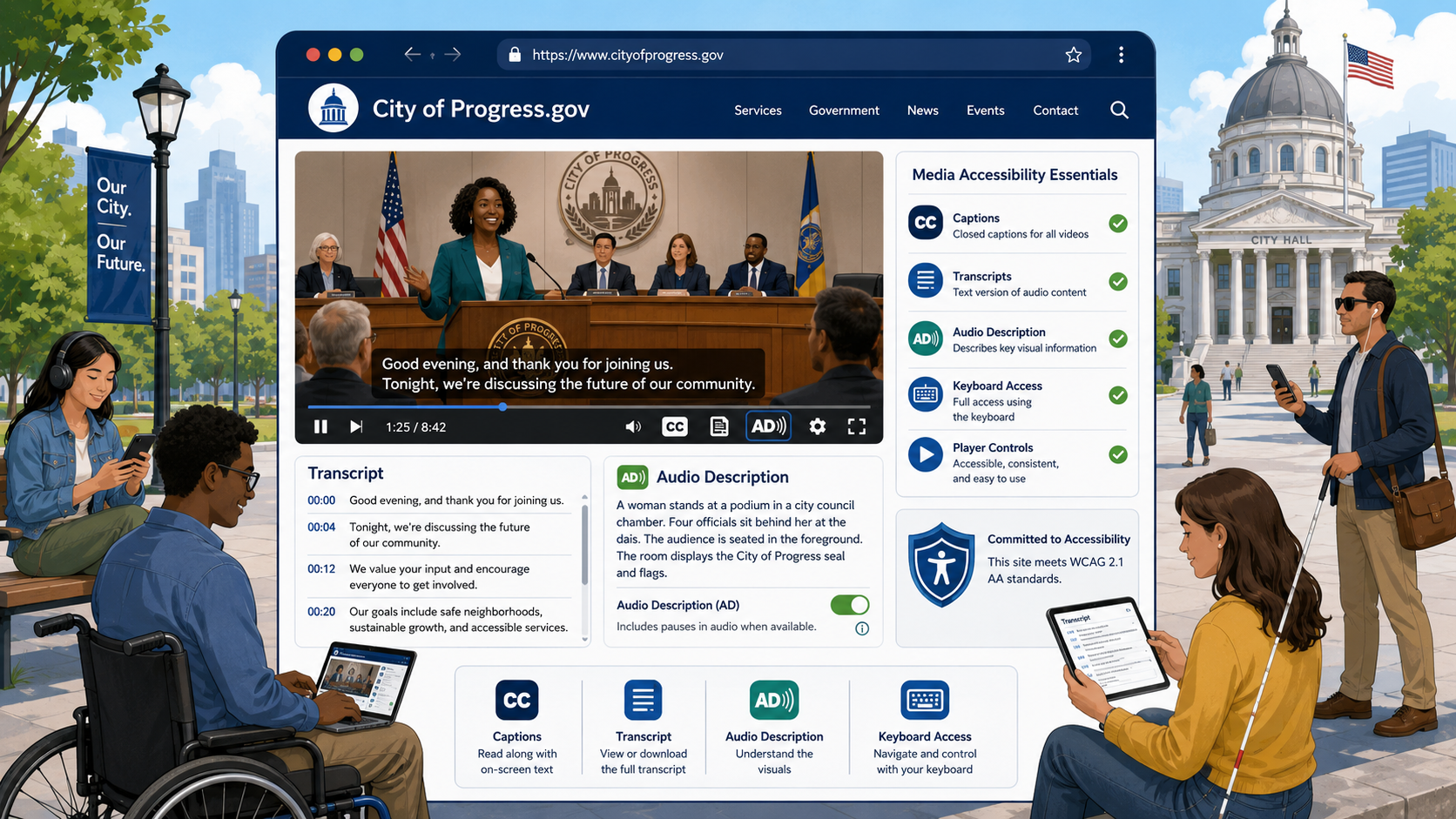
TL;DR: Every prerecorded video on a government website needs synchronized captions (WCAG 1.2.2). Prerecorded video that conveys information visually also needs audio description (1.2.5 at AA). Audio-only content needs a transcript (1.2.1). Live video needs live captions (1.2.4). YouTube’s auto-captions alone do not meet WCAG - they need human review. Under the DOJ’s 2024 ADA Title II rule, these requirements apply to nearly every state and local government in the US by April 2026 or April 2027.
Video has become one of the dominant ways government agencies communicate with the public - council meetings, emergency briefings, public hearings, training videos, “how to apply” walkthroughs, mayor’s addresses, and recorded testimony. And video is one of the most frequent accessibility failure points on government websites, because captioning, transcripts, and audio description take real effort and budget.
This guide explains exactly what is required, when, and how to do it correctly without breaking your budget.
Who Needs Video Accessibility - And Why It Is Bigger Than You Think
The audience for accessible video is much larger than the audience for any other accessibility feature. It includes:
- Deaf and hard-of-hearing people - over 37 million American adults report some degree of hearing loss.
- Blind and low-vision people who rely on audio description to understand visual content.
- Non-native English speakers who use captions to follow along.
- People in sound-sensitive environments like offices, hospitals, classrooms, and public transit.
- People watching on muted phones - which is the majority of social media video consumption.
Captions consistently increase video watch time and comprehension for everyone. They are also the law.
The WCAG 1.2 Success Criteria
WCAG 1.2 covers time-based media. There are nine success criteria in WCAG 2.1; only the Level A and AA ones are required for ADA Title II conformance. Here are the ones that matter for government websites.
1.2.1 Audio-only and Video-only (Prerecorded) - Level A
If you publish audio-only content (like a podcast or audio recording of a meeting), you must provide a transcript. If you publish video-only content (like a silent infographic animation), you must provide either a transcript or an audio alternative that conveys the same information.
1.2.2 Captions (Prerecorded) - Level A
All prerecorded video that has audio must have synchronized captions. This includes meeting recordings, mayor’s addresses, training videos, embedded YouTube videos - any video your agency hosts, embeds, or links to from official channels.
1.2.3 Audio Description or Media Alternative (Prerecorded) - Level A
For prerecorded video, you must provide either audio description or a full text alternative (a “media alternative”) that conveys all the information presented visually and aurally. At Level A, an alternative document is acceptable. At AA (1.2.5), full audio description is required.
1.2.4 Captions (Live) - Level AA
Live video with audio must include real-time captions. This includes live-streamed council meetings, emergency press conferences, public hearings, and live training events.
1.2.5 Audio Description (Prerecorded) - Level AA
Prerecorded video must include audio description when important visual content cannot be understood from the soundtrack alone. A talking-head video where the speaker says “as you can see in this chart” needs audio description; a video where the speaker describes everything they show may not.
Captions vs. Subtitles vs. Transcripts
These terms are often used interchangeably, but they are distinct.
Captions include all spoken dialogue plus relevant non-speech audio (music cues, sound effects, speaker identification, applause). They are designed primarily for people who cannot hear the audio. Captions can be open (always visible, “burned in” to the video) or closed (toggleable by the viewer). WCAG requires closed captions wherever feasible because they can be turned off, styled, and translated.
Subtitles typically translate dialogue from one language to another and assume the viewer can hear non-speech audio. Subtitles alone do not meet WCAG; they must include non-speech information to qualify as captions.
Transcripts are text documents that contain the full spoken content of a video or audio file. For audio-only content, a transcript is required. For video, transcripts are a useful supplement but do not replace captions for AA conformance, because they lack synchronization.
A “descriptive transcript” includes both dialogue and descriptions of important visual content, and can satisfy 1.2.3 as a media alternative.
How to Caption Videos - The Right Way
Why Auto-Captions Are Not Enough
YouTube’s automatic speech recognition produces captions that are typically 60 to 85 percent accurate, depending on speaker accent, audio quality, technical vocabulary, and background noise. WCAG and Section 508 effectively require near-100 percent accuracy: industry standard is 99 percent or better, and the FCC’s quality standards for broadcast captions require accurate, complete, properly placed, and synchronized captions.
Auto-captions are a starting point, not a finished product. Government videos almost always include proper names, place names, statute citations, and technical terms that auto-captioning gets wrong. “ARPA” becomes “our pa.” “Council member Nguyen” becomes “council member win.” “Resolution 2024-187” becomes “resolution twenty twenty four dash one eighty seven” - or worse.
The Captioning Workflow
A reliable government captioning workflow looks like this:
- Generate a draft. Use YouTube’s auto-captions, Zoom’s transcription, Rev’s AI service, Otter, Descript, or any speech-to-text tool to produce a starting draft.
- Human edit. A staff member or vendor reviews and corrects the draft against the audio. This is where 99 percent accuracy comes from.
- Add non-speech information. Insert speaker labels and bracketed sound cues like
[applause]or[gavel bangs]where they matter for comprehension. - Time and format. Captions should appear two lines maximum, around 32 characters per line, synced to within a couple hundred milliseconds of the audio.
- Export as WebVTT or SRT. Both formats are widely supported. WebVTT is the modern standard for HTML5 video.
- Upload to the video platform. Replace the auto-captions with your corrected file.
What About Vendor Captioning?
If your agency produces more than a handful of videos a month, a vendor like 3Play Media, Rev, Verbit, or AI-Media will be more reliable and often cheaper than internal labor. Typical pricing is between $1 and $3 per minute of video for human-edited captions, with faster turnaround costing more.
For live captions, vendors like AI-Media’s LEXI, EEG iCap, and 1CapApp can be integrated with Zoom, Microsoft Teams, YouTube Live, and most streaming platforms. Live human captioning (CART) runs $100 to $200 per hour and is the gold standard for important events.
Audio Description: What It Is and When You Need It
Audio description is a separate audio track that describes important visual content during natural pauses in the dialogue. For a government training video that shows a form with no narration of what is on the form, audio description fills in: “The application has three sections: applicant information, household income, and signature.”
When You Need It
You need audio description (or a media alternative) for any prerecorded video where important information is conveyed visually but not in the soundtrack. Common government examples:
- Training videos that show on-screen text, forms, or software interfaces without narration.
- Public service announcements with significant visual storytelling.
- Construction or infrastructure update videos that show maps, plans, or imagery.
- Educational videos with charts, graphs, or diagrams.
When You Probably Do Not Need It
A talking-head video of a press briefing, where the speaker is the only important visual element and they describe everything they reference, typically does not need separate audio description. The soundtrack already conveys the information.
How to Produce Audio Description
The cheapest approach is “integrated description” - writing scripts so narration naturally describes important visuals. This eliminates the need for a separate description track.
For existing videos, vendors can produce a description script, record it, and either mix it into the existing audio or deliver a separate audio description track. The W3C’s WebVTT specification supports description cues that screen readers can announce, though support varies.
Extended audio description, which pauses the video to allow longer descriptions, is rarely needed but useful for video-dense content like scientific demonstrations.
Live Captioning for Public Meetings
Live video is where most government agencies struggle. Council meetings, school board meetings, planning commissions, and public hearings often stream live and are then archived as recordings - so they need both live captions (1.2.4) and corrected prerecorded captions (1.2.2) once the recording is published.
A workable pattern:
- Use a live captioning vendor or service for the live broadcast.
- Save the auto-generated or live-captioned transcript.
- When the recording is posted, replace the live captions with a human-edited version within a reasonable time (commonly 14 days, though the DOJ’s 2024 rule does not specify a timeline).
Many streaming platforms now offer integrated live captioning, including YouTube Live, Vimeo, Microsoft Stream, Granicus, Swagit, and others. If your agency uses one of these for meetings, confirm the captioning quality before relying on it.
Common Mistakes on Government Sites
Relying Only on YouTube Auto-Captions
Auto-captions are marked with [CC] but they are not accessible. WCAG conformance requires accurate, edited captions.
Burned-In Captions in the Wrong Language
Captions burned into the video cannot be turned off, restyled for larger text, or translated. Closed captions are strongly preferred.
Captions That Block On-Screen Text
Default caption placement at the bottom of the screen can cover lower-thirds, chyrons, and on-screen text. Most captioning tools allow position adjustment to avoid this.
Missing Transcripts for Audio-Only Content
Podcasts, recorded radio addresses, and audio-only press releases need transcripts. This is a Level A failure.
Videos That Auto-Play with Sound
WCAG 1.4.2 (Audio Control) requires that any audio that plays for more than three seconds must have a way to pause, stop, or mute it. Auto-playing video with sound on the home page is both an accessibility and a usability failure.
No Captions on Embedded Vendor Videos
If you embed a vendor’s training video, demo, or product video, that video must also be captioned. The agency is responsible for the accessibility of everything on its site, including third-party embeds.
Where Video Fits in the Bigger Compliance Picture
Video accessibility is one piece of a larger framework. WCAG 2.2 AA conformance covers video alongside color contrast, keyboard access, and alt text. For higher education, the OCR resolution agreements include video as a frequent target of complaints, and many include specific captioning timelines.
For smaller agencies that produce only occasional video, see our accessibility guide for small local governments for a practical, budget-conscious approach.
Procurement Tips
When you buy a video platform, ask vendors:
- Do you support closed captions in WebVTT and SRT?
- Do you support multiple caption tracks (English, Spanish, etc.)?
- Do you offer integrated live captioning, and at what accuracy?
- Do you support audio description tracks?
- Is your player keyboard-accessible and screen-reader compatible?
- Do you provide a VPAT?
A vendor that cannot answer these is not ready for a government contract.
Monitor What You Publish
Most agencies post videos through multiple channels - the main website, a YouTube channel, a Granicus or Swagit meeting portal, social media, and embedded players in news posts - which means caption status is easy to lose track of. A video added to YouTube without captions, embedded on the homepage, and then forgotten can sit out of compliance for years.
Govzu continuously scans your government website for videos missing captions, audio missing transcripts, auto-playing media, and other WCAG 1.2 violations - across every page, every vendor embed, and every meeting archive - so your team knows immediately when a video goes live without proper captions.