
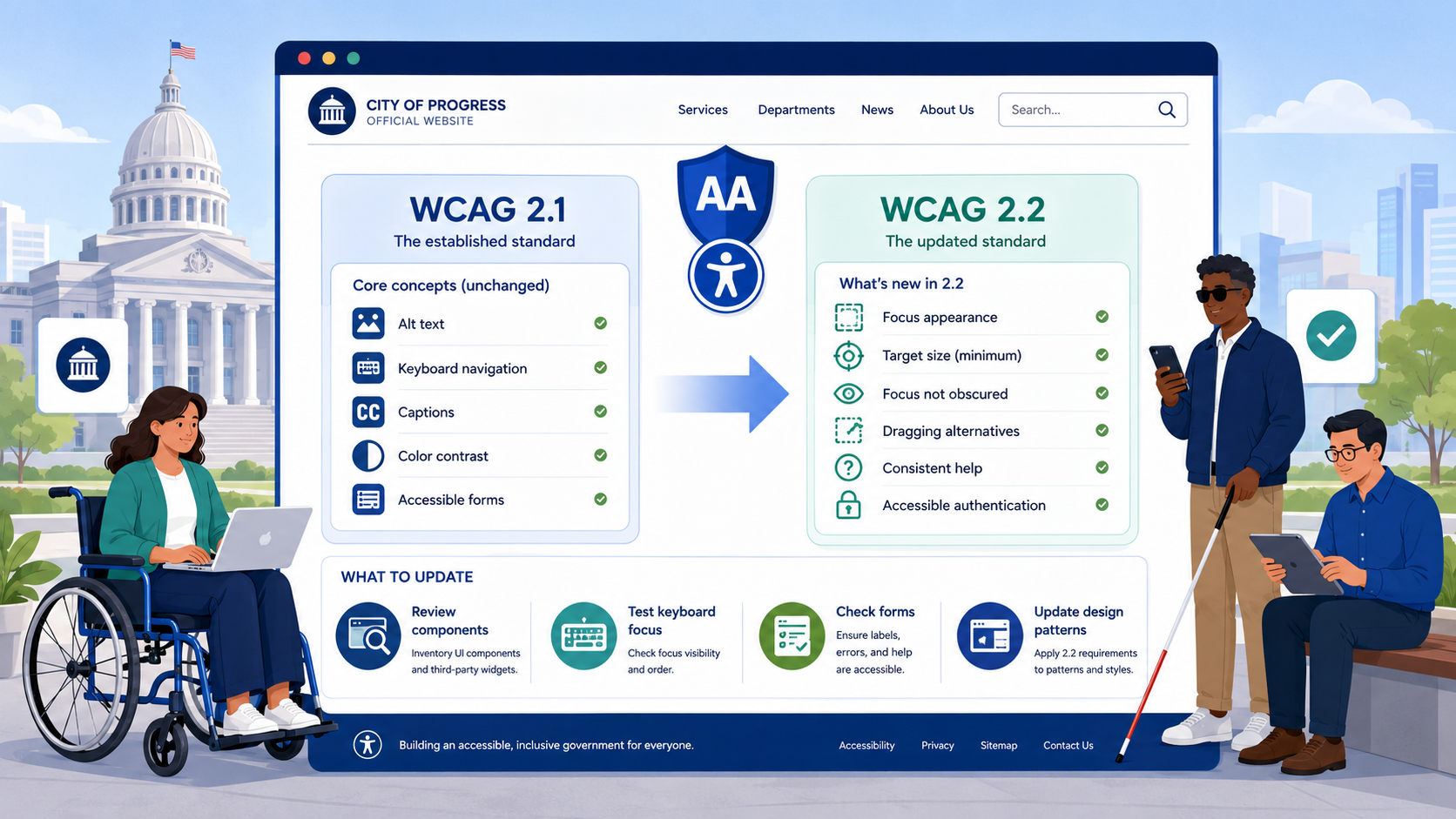
TL;DR: WCAG 2.2, published as a W3C Recommendation in October 2023, adds nine new success criteria — six at Level A and AA — and formally retires one (4.1.1 Parsing). The DOJ’s 2024 ADA Title II rule requires WCAG 2.1 Level AA, but because 2.2 is fully backward compatible, most government agencies should target 2.2 directly to avoid re-remediating in a few years.
The Web Content Accessibility Guidelines are versioned. WCAG 2.0 was published in 2008. WCAG 2.1 added 17 new criteria in 2018. WCAG 2.2 added another 9 in October 2023. The DOJ’s 2024 final rule names WCAG 2.1 Level AA as the required standard for state and local government websites, with compliance deadlines in April 2026 and April 2027 depending on entity size. This guide explains what changed between 2.1 and 2.2, what it means in practice for government web teams, and why most agencies should be targeting 2.2 even though the rule technically only requires 2.1.
The Short Version
WCAG 2.2 is additive. Every page that conforms to 2.2 Level AA also conforms to 2.1 Level AA, with one exception (Parsing) that was removed because browsers no longer fail in the way the criterion described. There are no breaking changes. If your team is starting remediation work today, there is no reason to target 2.1.
The Nine New Success Criteria
WCAG 2.2 added the following nine criteria. Each is described below with its level and a plain-language explanation of what government websites typically need to change.
2.4.11 Focus Not Obscured (Minimum) — Level AA
When a user tabs through a page, the element that receives focus must not be entirely hidden behind another element such as a sticky header, cookie banner, or chat widget. Partial obstruction is permitted at Level AA; full obstruction is not.
For government sites, this most commonly affects:
- Sticky navigation bars that cover the focused element on long forms
- Cookie consent banners that cover the first focusable elements of the page
- Skip-to-content links that themselves get covered by the new focus target
2.4.12 Focus Not Obscured (Enhanced) — Level AAA
The same rule, but no part of the focused element may be obscured. Most agencies will target the AA version, since AAA is not required for compliance.
2.4.13 Focus Appearance — Level AAA
Specifies a minimum size and contrast for the focus indicator itself. Because this is Level AAA it is not required under the DOJ rule, but it is good practice — many of the focus indicators added to meet 2.4.7 (Focus Visible) in older sites are too faint to be useful.
2.5.7 Dragging Movements — Level AA
Any functionality that uses a dragging movement (sortable lists, map panning, signature fields, slider controls) must also be operable with a single pointer click or tap without dragging. The most common failure on government sites is a “draw your signature” field on a permit application that has no keyboard or click alternative.
2.5.8 Target Size (Minimum) — Level AA
Interactive targets must be at least 24 by 24 CSS pixels, with documented exceptions for inline links in text, user-agent controls, and elements where the spacing between targets is sufficient. This catches small icon buttons, dense pagination controls, and the close buttons on modals.
Note that this is the Level AA threshold. The older Level AAA criterion 2.5.5 still requires 44 by 44 pixels. Agencies that have already met 2.5.5 are automatically compliant with 2.5.8.
3.2.6 Consistent Help — Level A
If a page offers help (a contact link, phone number, chat widget, self-help link), the help mechanism must appear in the same relative order across pages where it occurs. This is straightforward for most agency sites that use a consistent footer.
3.3.7 Redundant Entry — Level A
Information the user has already entered in the same session must not be required again. If a permit application asks for an address on step 2, it cannot ask the user to retype the same address on step 5. The user must be able to auto-fill, select from a previous answer, or have the field pre-populated.
This is one of the most commonly failed criteria on government forms, where multi-step applications often re-ask for identifying information at each step.
3.3.8 Accessible Authentication (Minimum) — Level AA
A cognitive function test (such as remembering a password, solving a puzzle, or transcribing characters) cannot be the only way to authenticate. There must be an alternative method, such as a password manager being permitted to autofill (the field must not block paste), a one-time code sent by email or SMS, or a biometric option.
Many older government login systems block paste on the password field, which is now a Level AA failure.
3.3.9 Accessible Authentication (Enhanced) — Level AAA
The same rule, but without the password-manager exception. Not required under the DOJ rule but encouraged.
What Was Removed: 4.1.1 Parsing
WCAG 2.1 included success criterion 4.1.1 (Parsing), which required that markup have valid start and end tags and unique IDs. The criterion was removed in 2.2 because the parsing failures it described no longer cause accessibility problems in modern browsers — HTML5’s defined error handling means browsers and assistive technologies handle malformed markup consistently.
You do not need to fix 4.1.1 failures to claim 2.2 conformance. Note, however, that if your agency is making a 2.1 conformance claim under the DOJ rule, 4.1.1 still technically applies. This is one of several reasons to skip 2.1 and target 2.2 directly.
How WCAG 2.2 Relates to the DOJ Rule
The DOJ rule names WCAG 2.1 Level AA, not 2.2. Strictly speaking, an agency that meets 2.1 Level AA is compliant with the rule on April 24, 2026, regardless of 2.2.
However, three considerations argue for targeting 2.2:
- Backward compatibility. Every page that meets 2.2 Level AA also meets 2.1 Level AA (except for the removed 4.1.1). Targeting 2.2 is strictly more conservative.
- OCR enforcement trajectory. The Department of Education’s Office for Civil Rights has been citing WCAG 2.1 since approximately 2019. The pattern across federal civil rights enforcement is that the cited standard moves to the latest stable W3C Recommendation within a few years of publication. Agencies that remediate to 2.1 in 2026 will likely need to re-remediate to 2.2 by 2028 or 2029.
- Procurement alignment. Vendors are publishing VPATs against WCAG 2.2 now. Aligning your internal standard with the standard your vendors are claiming is administratively simpler.
For a complete walkthrough of the 50 Level AA criteria in WCAG 2.2 — including all nine new ones — see our WCAG 2.2 Level AA checklist.
Practical Remediation Priorities
If your agency has an existing WCAG 2.1 conformance claim and you are moving to 2.2, the following five issues account for the majority of new findings on government sites:
Forms and Multi-Step Applications
3.3.7 (Redundant Entry) and 3.3.8 (Accessible Authentication) are the highest-impact additions for any agency with permit applications, license renewals, benefits applications, or login portals — areas that already drive most accessibility failures on government sites. Audit every multi-step form for re-asked information, and audit every login page for paste-blocked password fields.
Sticky UI Elements
2.4.11 (Focus Not Obscured) catches sticky headers, footers, and persistent banners. Test every page by tabbing from the address bar through every focusable element and verifying the focus indicator remains visible at all scroll positions.
Small Interactive Targets
2.5.8 (Target Size) catches icon-only buttons (close, sort, expand), dense pagination controls, and toolbar buttons. Measure rendered size, not source size — CSS scaling matters.
Drag Interactions
2.5.7 (Dragging Movements) catches signature pads, sortable lists, map panning, and range sliders implemented as drag-only. Each needs a non-drag alternative.
Help Placement
3.2.6 (Consistent Help) is usually straightforward. The most common failure is a chat widget that appears on some pages and not others, or appears in different screen positions across pages.
What This Means for Your Compliance Program
If your agency is in the middle of remediation work for the April 2026 deadline, here is the simplest path forward:
- If you have not yet defined your conformance target, target 2.2 Level AA.
- If you have defined 2.1 Level AA, add the six new Level A and AA criteria from 2.2 to your scope. Treat the removed 4.1.1 as out of scope.
- If you are scoping a new website procurement or major redesign, write WCAG 2.2 Level AA into the requirements. See our guide to VPATs and procurement for how to evaluate vendor claims.
- Update your accessibility statement to reflect the standard you are actually targeting.
Smaller agencies with limited resources can use the same approach. The web accessibility guide for small local governments walks through how to phase this work realistically.
How Govzu Helps
Govzu scans government websites against both WCAG 2.1 and WCAG 2.2 Level AA, flagging every new 2.2 criterion separately so your team can see exactly what additional remediation work the upgrade requires. The platform tracks each issue against the specific success criterion, prioritizes findings by user impact, and gives ADA Coordinators a defensible audit trail of conformance over time — so you can target the latest stable WCAG version without losing visibility into compliance with the version the DOJ rule actually cites.